
Here's why your design skills are still relevant in a digital world
 Hi, I'm Justin, owner of Ajar Productions.
If you're like many designers I know, you're able to produce some fantastic designs using InDesign.
But now clients are asking for digital projects like HTML5 websites and mobile apps, which requires a completely different set of skills.
There are tons of online courses to help you, but they take hours to watch and they often involve coding.
Wouldn't it be easier if you could simply translate your designs into web and mobile experiences?
in5 translates your InDesign layout to an interactive HTML experience
I funded in5 (InDesign to HTML5) on Kickstarter because I knew there was an easier way for designers to build interactive experiences.
How in5 works
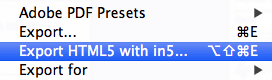 The HTML files are exported to your hard drive just like a PDF, and are yours to keep and modify as you please.
Customer success stories
Thousands of designers have exported their InDesign layouts to interactive sites and apps. Check out these great projects created by in5 customers.

JETS Online Catalogues
Liz Maratheftis from JETS digital has designed stunning online catalogues using in5. She incorporates video, animation, and interaction.

Allegheny College Magazine
Penny Drexel, Director of Art & Publications at Allegheny College, now publishes her magazines online with in5.

Educabilidad
Stephanie Carreón released her Spanish-language academic journal online with a (universal) desktop version and Web App versions for iPad and Android that can be saved to the Home Screen.
in5 is used by companies of all sizes

Key benefits of in5

Fully integrated with InDesign
in5 unlocks InDesign's most powerful interactive features using InDesign's own user interface.

Export to any device
Your HTML5 output will work on any computer, tablet, or smartphone.

No coding required
You can design visually, and in5 will write the code for you!
In addition to creating files ready-made for mobile apps, in5 lets you bypass the App Store with a Web App.
What the experts are saying about in5

Keith Gilbert
Principal, Gilbert Consulting
in5 picks up where InDesign leaves off, providing a new output path for our favorite design tool!

Bob Levine
aka The InDesign Guy
in5 makes what was once a frustrating, convoluted process, straightforward and simple.

David Blatner
Co-host, InDesignSecrets
in5 is awesome! It’s really amazing!
You can start publishing today with in5

30–Day Money Back Guarantee
What if I buy an in5 subscription and it doesn't work for me?
We'll be happy to look into any issues that you send us.
We also offer a 30–day money back guarantee. If you don’t like in5, you get your money back.

Discovering in5 was key—we had our first online, interactive magazine published!
Ajar Productions has been extremely helpful along the way, and their step–by–step tutorials are great.
I can’t wait to get started on our next issue!
Penny Drexel — Art Director
Special referral prices from
Subscription Plans
There are also Enterprise plans, Classroom discounts, and InDesign Server licenses available.
Have a previous version of in5? Enter your serial number for a migration discount.
Hurry...this offer expires in...
Subscription plan benefits

Seemless migration
You can move to a different computer at any time. For companies, you can transfer licenses to different users as employees come and go.
Easily change InDesign versions
Your in5 subscription will activate all installed versions of InDesign, and let you move to new versions with ease. Great for Creative Cloud subscriptions.
Always up to date
You'll always have access to the latest features. You'll also get access to features that are only available with subscription plans.
Full Plan Comparison
Click the  icons below to see a video preview of each feature.
| Elite/ Enterprise | Gold | Pro | Starter | |
|---|---|---|---|---|
| Basic export features | ✓ | ✓ | ✓ | ✓ |
| Basic Interactive Widgets (Audio, Video, Hyperlinks, Slideshows, Pan & Zoom, Image Sequences, Scrolling Frames) | ✓ | ✓ | ✓ | ✓ |
| Pro Interactive Widgets (3D Flip Card, Form Element Data, Mobile Article Explorer) | ✓ | ✓ | ✓ | |
| Build Wizards: Menu Builder, Pop-up Builder, Slideshow Builder | ✓ | ✓ | ✓ | |
| Flipbook page transition | ✓ | ✓ | ✓ | |
| Viewer Display (page thumbs, progress, zoom, fullscreen) | ✓ | ✓ | ✓ | |
| Presentation Mode (fullscreen, keyboard navigation, slide builds, etc) | ✓ | ✓ | ✓ | |
| Custom Slide Transitions | ✓ | ✓ | ✓ | |
| Image optimization & compression | ✓ | ✓ | ✓ | |
| Export Presets | ✓ | ✓ | ✓ | |
| Responsive Layouts | ✓ | ✓ | ||
| Parallax Backgrounds | ✓ | ✓ | ||
| Fixed Position Elements | ✓ | ✓ | ||
| Image Consolidation & Enhanced Optimization | ✓ | ✓ | ||
| Scriptable API | ✓ |
Frequently Asked Questions
What's so great about the Pro plan?
The Pro plan has an extra features for professional designers and publishers to help them save time when creating publications.
Will my content continue to work even if I cancel my subscription?
Yes, the output yours to save and change as you like. It will not expire if you stop using in5.
Is there a way I can automate or script in5?
Yes, the Elite and Enterprise plans can batch export several documents at once, and they also allow scripting automation.